
Languages
Every visible string in AUI is a translation key. This is the default path, not an opt-in: a view whose key is missing from the default language will not build.
The files
One JSON file per language in Assets/AUI/Lang/, named by language code.
// en.json
{
  "_name": "English",
  "shop": {
    "title": "Shop",
    "buy": "Buy",
    "owned": "You own {count} {itemName}"
  }
}// tr.json
{
"_name": "Türkçe",
"shop": {
"title": "Mağaza",
"buy": "Satın al",
"owned": "{count} {itemName} sahibisin"
}
}_nameis the language's native display name, which is what the picker shows.- Nesting is a convenience. The file is flattened to dotted keys, so the key above is
shop.owned. - Numbers and booleans become their text. Arrays and nulls are errors (AUI302).
- The languages your world ships are exactly the files you provide.
The default language code lives on AuiSettings (defaultLanguage, en out of the box).
Using a key
<text key="shop.title" class="title"/>
<button onclick="Buy" key="shop.buy" icon="shopping-cart"/>
<option value="low" key="quality.low"/>
<input bind="{nick}" placeholder-key="profile.nickHint"/>
<slider bind="{vol}" format-key="audio.percent"/>
Anything that shows text takes a key. A <text> may instead take text="{binding}" for a runtime value, or literal content:
<text>Debug build</text> <!-- literal, never translated; reported as info AUI117 -->AUI117 is informational, not a complaint. It exists so you can find every string that will stay English when you decide to ship another language.
Placeholders
A translated string may contain {placeholder} names, filled from bindings listed in args:
<text key="shop.owned" args="{count} {itemName}"/>Count = "3";
ItemName = "hats";Matching is by name, not by position, so a translation may reorder them freely. That is the whole point: Turkish puts the count somewhere English does not.
Up to four placeholders per string. A placeholder with no matching binding is AUI304; placeholders that differ between languages, or from what args supplies, is AUI307.
A slider's format-key string uses {value}, which is filled by the slider itself:
{ "audio": { "percent": "{value}%" } }Checks you get
| Code | Meaning |
|---|---|
| AUI301 | key missing in the default language. An error; the view does not build |
| AUI300 | key missing in some other language. A warning, listing which |
| AUI303 | key= names a key no language file defines |
| AUI304 | a {placeholder} with no matching args binding |
| AUI307 | placeholders differ between languages, or from args |
| AUI306 | the same flattened key defined twice |
| AUI305 | no language files found at all |
So a missing translation is caught when you save the file, not when a player switches language.
Switching language in-world
The scene's AUI Language Service owns the current language and fans out to every view.
lang.SetLanguage(2);              // by index
lang.SetLanguageByCode("ja");     // by code
lang.ClearChoice();               // follow the player's client language again

int    i    = lang.GetLanguage();
string code = lang.GetLanguageCode();
int    n    = lang.LanguageCount();
string name = lang.LanguageName(0);
lang is a field on every view, found by name at start.
A player's choice is persisted with VRChat's PlayerData, so it survives rejoining. Until they choose, the client's own language is followed.
When the language changes, every live view repaints its keyed text, re-measures and re-solves. If you set text by hand with SetText, re-apply it in OnRetranslate:
protected override void OnRetranslate()
{
    SetText(GetElement("#status"), _myStatusString);
}
The language picker
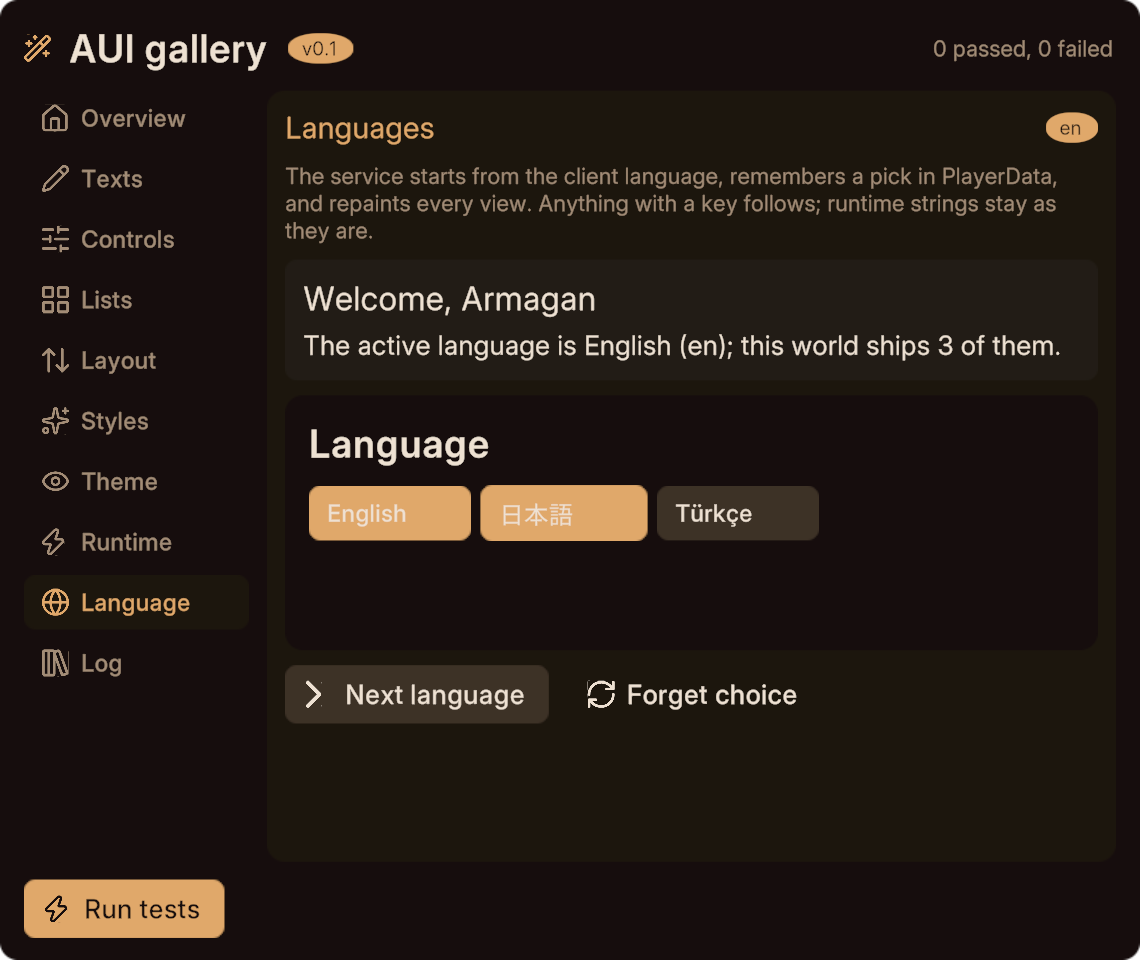
AuiLanguagePicker ships with the package: one chip per language, the current one highlighted, tap to switch. Drop it anywhere as a nested view.
<page id="lang"><AuiLanguagePicker/></page>Fonts
AUI/Bake Fonts builds font atlases containing exactly the glyphs your language files use, plus AuiSettings.extraCharacters and the configured unicodeRanges (which cover Latin, Latin Extended, Greek, Cyrillic, punctuation, currency, arrows, CJK punctuation and fullwidth forms out of the box).
Each Inter weight gets an atlas; characters Inter does not have fall back to Noto JP, then KR, then SC. The result is AuiFontSet.asset, assigned to the settings.
Re-run AUI/Bake Fonts whenever a language file gains characters the atlases lack. Boxes instead of letters in-world is the symptom. AUI600 warns when the charset has changed since the last bake; the check runs whenever the scene's language table is rebaked.
Runtime strings need glyphs too
Player names are not in your language files, so their characters may not be in the static atlases. The font set keeps a capped dynamic Inter atlas and a capped dynamic Noto Sans JP atlas for exactly this. Keep a CJK character in AuiSettings.boundTextSample so bound text boxes are measured tall enough for the fallback's line height (the sample's characters are baked too).
Adding a language later
- Add
Assets/AUI/Lang/<code>.jsonwith every key. - Run
AUI/Bake Fontsif it introduces new characters. - Every view is queued and the ones whose key indices moved rebuild; the scene's service is rebaked at the end of that drain. If the scene has no
AUI Language Serviceyet, runAUI/Rebuild Language Tableonce.
Adding a key shifts key indices, so every view rebuilds. That is by design: the baked text elements store key indices, not strings.
Next
- Bindings for
argsand runtime text. - Services and settings for the full service API.
- Theming, which uses the same service to fan out palette changes.